On September 8, OpenAI released ChatGPT Images 2.5, cutting generation latency by up to 50% and adding a feature that changes the editing workflow: you can now draw on the image to tell the AI what to change. The model also handles multi-turn edits better, so earlier changes don't get lost in later rounds. But the real shift is in the interface—AI image editing is moving from "describe what you want" to "point at what you want."
The update comes just five months after Images 2.0 launched in April 2026. OpenAI says people already generate over 3 billion images per week across ChatGPT Images and the API. Images 2.5 is now available to all ChatGPT, ChatGPT Work, and Codex users across desktop, mobile, and web.
50% Faster—But the Real Upgrade Is Editing
The headline number is straightforward: generation latency dropped by up to 50% compared to Images 2.0. That turns a 10-second wait into 5 seconds—noticeable, but not revolutionary.
The sharper details, more natural lighting, and richer textures are incremental improvements. OpenAI claims the model is better at preserving reference photo subjects across style changes, but the real improvement is in editing, not generation.
Higgsfield AI's product lead noted that the model's most impressive quality is its understanding of "what not to change." A meaningful edit won't lose the original character's appearance, composition, or visual style. That's the difference between usable and frustrating.
Draw a Circle. Tell It What to Change.
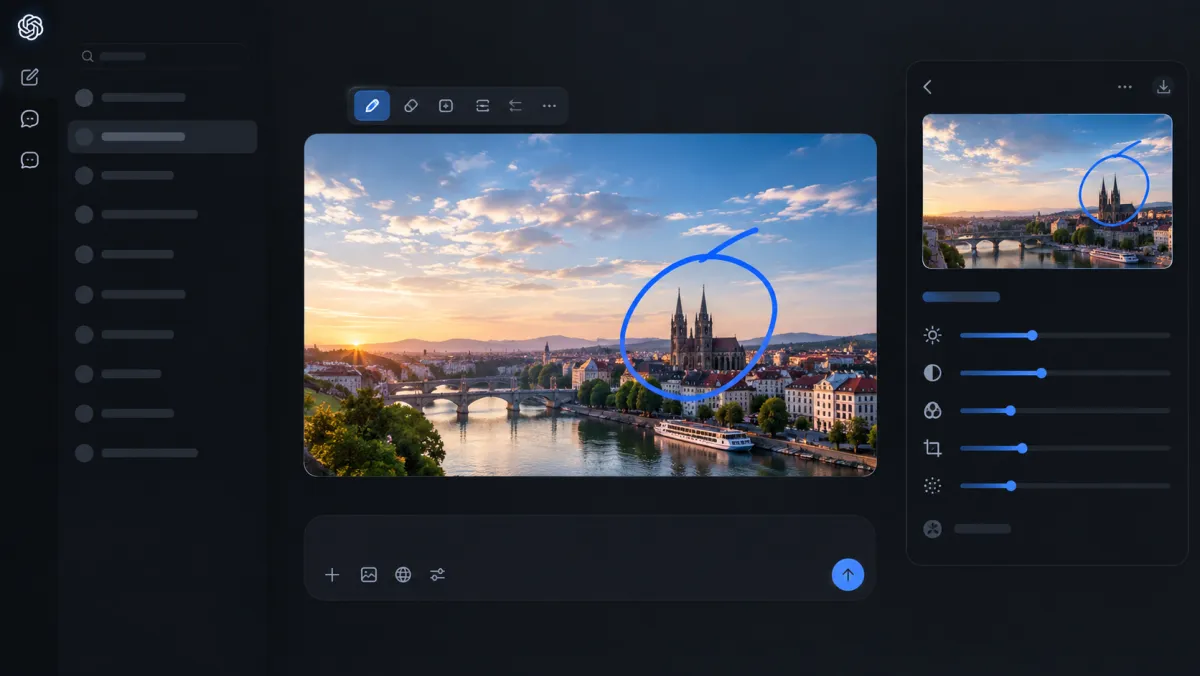
The most significant new feature is the ability to place comments directly on images. You can draw a circle around a specific area and tell the AI to change just that part—without rewriting a prompt to describe where it is.
Previously, editing a single element required describing its position in the image. Now you can point to it. For product photos, campaign materials, and brand assets, this is practical. When you need to change a color, remove an object, or adjust a background, you mark the spot and the model handles the rest.
Axios tested the feature and found it useful for iterative edits: uploading an existing image, adding new elements, then circling specific areas to adjust color and detail, with the model continuing to refine based on those local instructions.
Scribble a Layout. Get a Finished Image.
OpenAI also added Sketch: type "@Sketch" in ChatGPT, draw a rough layout, add a style description, and the model turns it into a complete image.
The threshold is not drawing skill—it's the ability to communicate spatial layout. OpenAI examples include a room layout sketch turned into a design rendering, or a simple contour turned into a finished illustration. The model fills in the gaps; the human defines the structure.
Flare for Speed, Sunburst for Precision
OpenAI split the API offering into two models:
GPT-Image-2.5 Flare: The default choice. OpenAI says it generates images 2 to 4 times faster than GPT-Image-2, with better support for transparent backgrounds. Suitable for social content, product experiences, visual search, and high-volume generation.
GPT-Image-2.5 Sunburst: Slower, but offers tighter control. Designed for production-ready campaign creative and polished product imagery.
Both models cost the same: $8 per million image input tokens, $30 per million image output tokens.
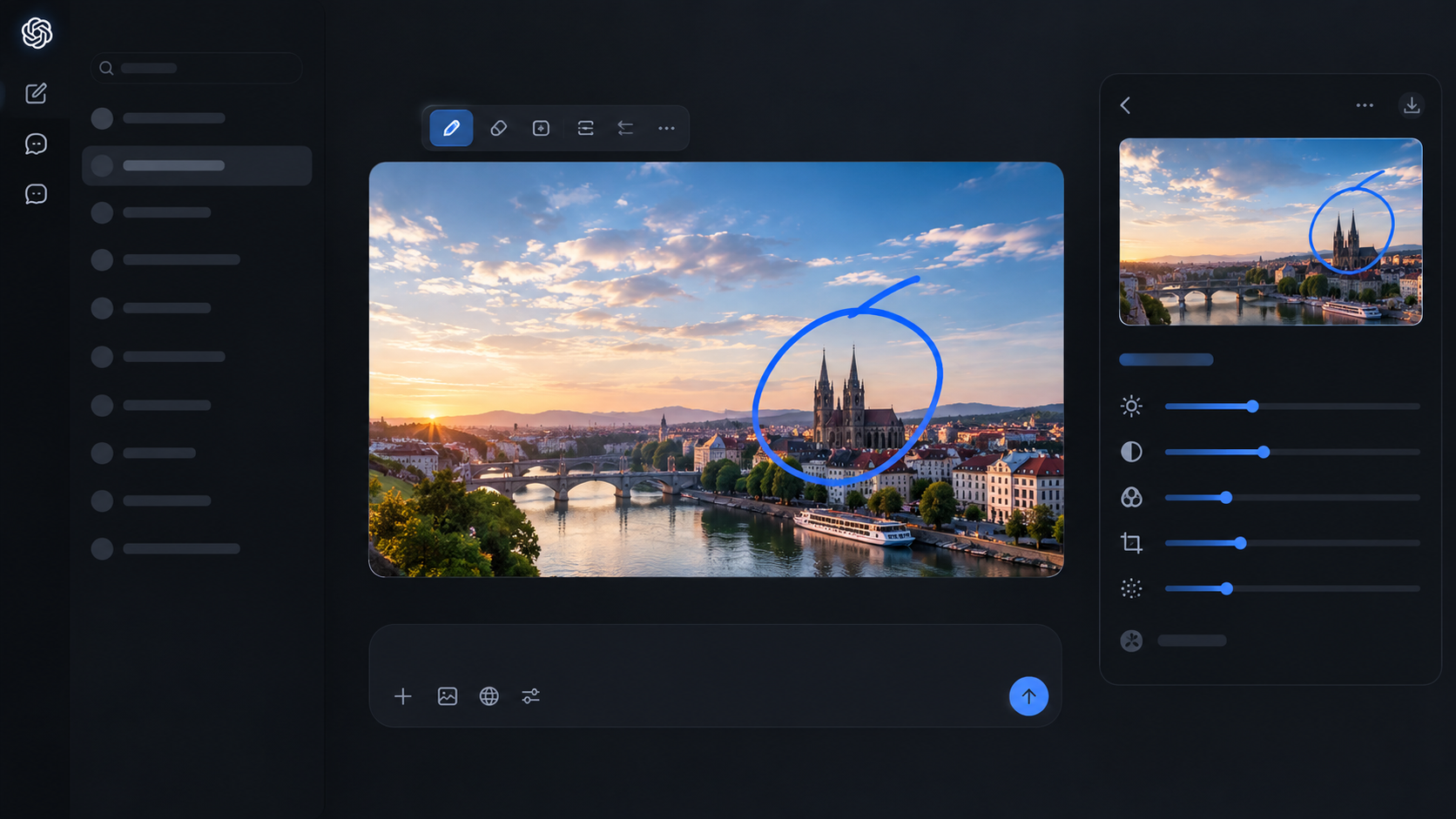
AI Image Editing Is Moving from Prompts to Pointing
Images 2.5 is not a leap in image quality. It's a leap in editing workflow. The model still has limits: multi-turn edits can degrade quality over time, as testers noted in complex cases. But the direction is clear—AI image generation is moving from "write a good prompt" to "show the AI what you want."
The 3 billion images per week figure is the context. This is not a niche tool anymore. It's a production system, and production workflows require precision, not just speed.
P.S. Adobe has already confirmed it will integrate Images 2.5 into Firefly. When the incumbent creative suite adopts the new model, you know the editing workflow shift is real.
Frequently Asked Questions
Q: What is ChatGPT Images 2.5?
A: ChatGPT Images 2.5 is OpenAI's latest image generation model, released on September 8, 2026. It cuts latency by up to 50%, adds point-and-edit drawing, sketch-to-image, and improved multi-turn editing. It's available to all ChatGPT, ChatGPT Work, and Codex users.
Q: What is the point-and-edit feature?
A: You can draw a circle or mark an area directly on an image and tell the AI what to change—without rewriting a prompt to describe the position. This makes iterative editing much faster and more precise.
Q: What is Sketch?
A: Sketch is a new feature where you type "@Sketch" in ChatGPT, draw a rough layout, add a style description, and the model turns it into a complete image. It lowers the barrier for non-designers to communicate spatial ideas.
Q: What are the two API models?
A: Flare: The default option, 2-4x faster than Images 2.0, ideal for social content, product experiences, and high-volume generation. Sunburst: Slower but offers tighter control, designed for production-ready campaign creative and polished product imagery.
Q: How much does Images 2.5 cost?
A: Both Flare and Sunburst API models cost $8 per million image input tokens and $30 per million image output tokens.
Q: How fast is Images 2.5?
A: Generation latency dropped by up to 50% compared to Images 2.0, turning a 10-second wait into about 5 seconds.
Q: Does Images 2.5 improve image quality?
A: OpenAI claims sharper details, more natural lighting, richer textures, and better preservation of reference subjects across style changes. However, the most significant improvements are in editing workflow and speed, not raw quality.
Q: Is Adobe integrating Images 2.5?
A: Yes. Adobe has confirmed it will integrate Images 2.5 into Firefly, signaling that the editing workflow shift is real and being adopted by the incumbent creative suite.
Q: What are the limits of Images 2.5?
A: Multi-turn edits can degrade quality over time, according to early testers. The model can also misunderstand instructions on complex edits, and iterative changes sometimes produce unintended results.
Q: How many images does OpenAI generate per week?
A: OpenAI says people generate over 3 billion images per week across ChatGPT Images and the API, indicating the tool has become a production system rather than a niche product.