
On October 16, 2026, SuperCrzy released SuperCrzy Bot 1.1.3 alongside a 0.4.0 engine update, with the full pnpm monorepo available at github.com/SuperCrzy/Supercrzy-Bot. The product is a runnable AI agent workbench — an agent loop, 44 registered tools, a multi-channel gateway, an experience base that compounds across tasks, and a local SQLite store — packaged as a single process that serves both its interface and its API on one port.
It remembers what worked
Most agent sessions start from zero. SuperCrzy Bot does not.
After a task finishes, the agent writes a retrospective into a Playbook — a store of what worked, which tools were used, what failed. On a subsequent similar task, matching entries are injected back into context before the run starts. The assistant that starts every session fresh and the one that accumulates are different products, and the difference compounds.
Alongside the Playbook sits long-term memory: facts extracted and persisted across sessions, weighted when injected, deduplicated over time. Together they give the system two distinct learning surfaces — durable facts about you and your projects, and reusable procedure from tasks already done.
Neither is a fine-tune. Both are inspectable, editable and deletable, which matters for anyone who has tried to unteach a model something it learned from a bad session.
It checks its own work — with a different model
The Collaboration Hub runs a task through a fixed serial pipeline: plan, execute, review, deliver. The review stage does not run on the same model that did the work.
Execution defaults to DeepSeek. Quality review runs on Kimi. A full "senate" tier brings DeepSeek, Kimi and GPT into one review. The design assumption is blunt: a model grading its own output is a weak check.
The project's own audit tool went further. It found that feeding source code to a plain language model surfaced essentially zero real defects — so the audit members are tool-using agents that actually read, grep and list files. Every stage persists to a collab_tasks table, so a run survives a restart rather than restarting from zero.
Precision is a parsing problem
Shell execution is where an agent platform earns or loses trust, so the defences are stacked rather than singular. A command blacklist catches the extremes — root deletion, sudo, fork bombs, curl-pipe-to-shell. A second tier scans the command for dangerous paths in pure Node, so it holds in any environment. On macOS a third tier applies a kernel-level sandbox-exec profile — the SBPL equivalent of Linux Landlock — that permits the project repository and /tmp and denies all reads and writes under the user's home directory.
Commands are split into segments, quote- and heredoc-aware, and rm is graded by shape: recursive, sudo-prefixed or path-escaping commands are blocked; a non-recursive delete inside /tmp or the workspace is allowed. The difference between a safety feature and a speed bump is in the parsing.
The same restraint shapes the approval path. Sensitive tools declare requiresApproval on the tool definition itself, and a build-time validator asserts that this declaration and the dangerous-tool list cannot drift apart. At runtime a three-way classifier assigns each attempted command a verdict: allow, ask or block. The block verdict is unconditional and evaluated before any whitelist lookup.
44 tools, but only 12 in the window
Tool count is a poor proxy for capability, so SuperCrzy Bot keeps the working set small. Of 44 registered tools, 12 stay resident in the model's context. The rest are indexed and pulled in on demand through a tool_search hop — cheaper turns, and fewer opportunities for the model to reach for the wrong instrument.
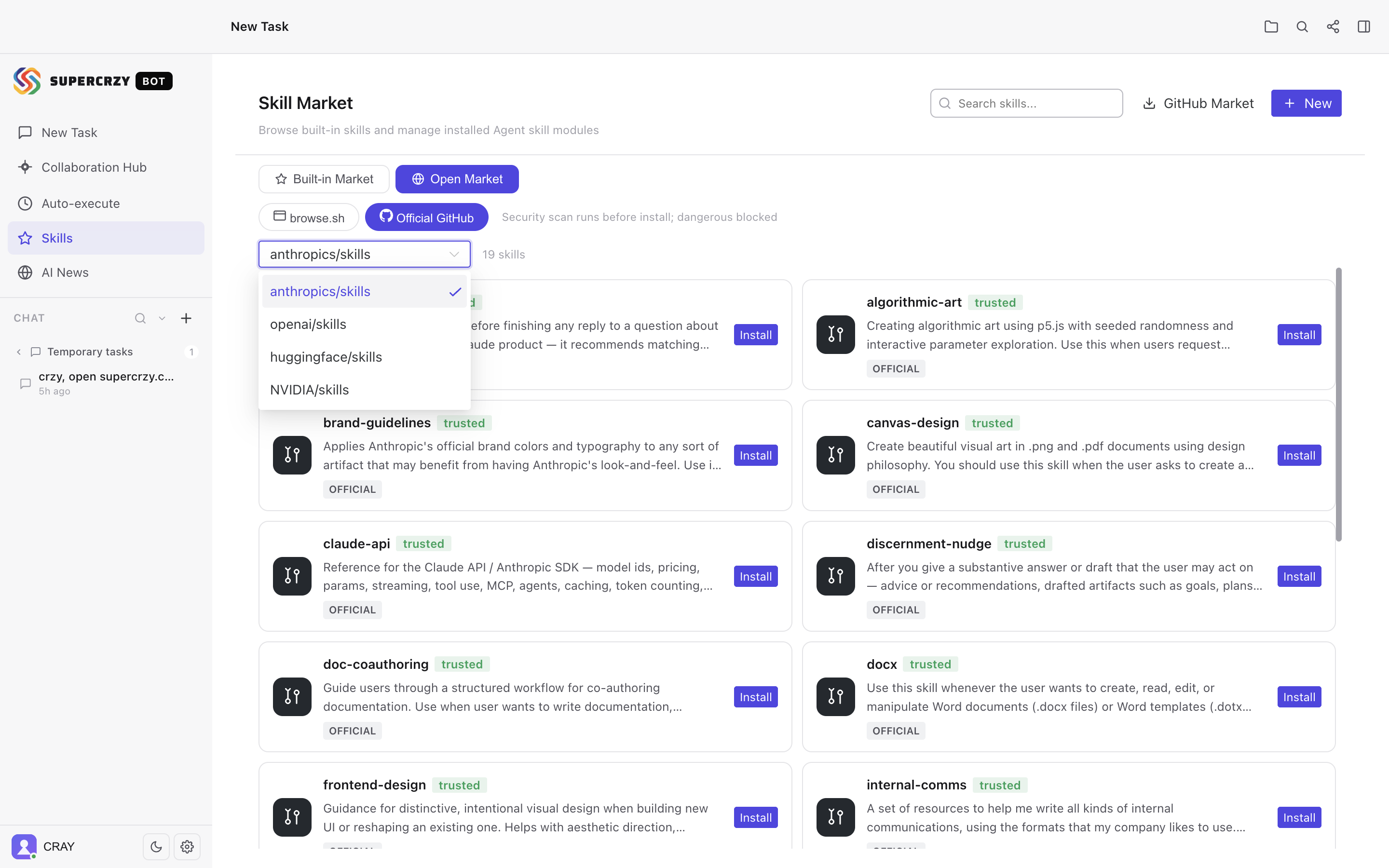
Skills work the same way. A catalog of 32 built-in skills covers code generation, review, debugging, deep research, browser automation, scheduling, translation and data analysis. Twelve install on first run and the rest stay one click away, and matching is automatic — only skills relevant to the task load into context.
Beyond the built-ins, the app indexes open sources: 461 browser-automation skills served by browse.sh, plus the official skill repositories of OpenAI, Anthropic, Hugging Face and NVIDIA. The packaging follows an open convention rather than a proprietary format — a skill written for one agent is portable to another that speaks the same standard.
One agent, every channel
The gateway connects WeChat, WeCom, DingTalk, Feishu, QQ, Telegram, Discord and Slack over long-lived connections, so no public callback URL is required — the usual blocker for anyone behind NAT or without a domain. What matters more is what the channels share: the same session store, the same skill library and the same memory as the desktop app. Ask something in Telegram and the fact is there in the desktop interface.
Two structural limits are worth stating. Five of the eight channels are Chinese platforms, so a team outside China will realistically wire up three. And the gateway has not been independently audited.
Execution you can rewind, branch and resume
Every step of reasoning and every tool call is rendered live as a timeline, and that timeline is replayable. It is also branchable and resumable: runs are written to checkpoints as they progress, so a long task that dies halfway does not restart from the first token. You can inspect a run, branch from an earlier point and take a different approach without redoing the work that already succeeded.
The SSE write path is guarded against two failure modes that both present as a frozen interface while the backend reports healthy. A naive res.write(chunk) returns false when the socket buffer fills, so a slow client makes events pile up in server memory. And writing after a client disconnects throws, which — because the response is detached from Koa — becomes an uncaught exception that takes the whole backend down. Both are handled in one guarded write path, and the counters are exposed on the health endpoint. "Is it stuck?" now has a number rather than a hunch.
Bring your own model key
SuperCrzy Bot does not meter inference and never sits between you and your provider. You supply a key — DeepSeek, OpenRouter, OpenAI, Anthropic, Gemini, xAI, Mistral, Qwen, NVIDIA NIM, Zhipu, Kimi or a local Ollama instance — and the app talks to that provider directly. Thirteen presets ship in the box; OpenRouter alone opens more than 200 models behind a single key.
Your sessions, messages and extracted memory live in ~/.supercrzy/data/supercrzy.db — one file, on your disk, readable with any SQLite client. Because the app holds no inference contract, switching models is a dropdown, not a migration.
What shipped in the engine and desktop builds
The engine release is largely a localization and reliability pass. Several views — scheduled tasks, routines, the collaboration workbench, sidebar entries, the file tree, tool-call cards — had been rendering Chinese even with the interface set to English. All of them are now wired to i18n.
The voice default changed for a reason worth stating plainly. The previous default, zh-CN-XiaoxiaoNeural, is Chinese-only and reads English with an audible accent. The new default, en-US-AvaMultilingualNeural handles both without one.
Two desktop fixes round out the release. Clicking the window's close button hides the app to the tray, but it was not hiding the native browser view layered above the interface — leaving a black rectangle on screen until the window was restored. And when the update source was unreachable, a background check at startup surfaced a raw net::ERR_CONNECTION_CLOSED in the top banner. That check is now silent; the raw error stays in the settings log.
SuperCrzy Bot is MIT-licensed and self-hosted, with no managed offering, no SLA and no support contract. Setup expects Node 22.x and pnpm 10.x, pinned deliberately because a mismatched toolchain is the most common failure mode. You need your own provider key, and for the Chinese channels, a platform account.
P.S. The full monorepo is open at github.com/SuperCrzy/Supercrzy-Bot — client, server and desktop shell included. Node 22.x and pnpm 10.x are the only hard requirements to get it running.
Frequently Asked Questions
Q: What does "grows with you" actually mean in the product?
A: Two mechanisms. A Playbook stores what a completed task did, which tools it used and what failed, and injects matching entries into similar future tasks. Long-term memory stores durable facts about you and your projects across sessions. Both are inspectable and editable, not a hidden fine-tune.
Q: Why does the review stage use a different model?
A: Because a model grading its own output is a weak check. Execution defaults to DeepSeek, quality review runs on Kimi, and a "senate" tier brings DeepSeek, Kimi and GPT into one review. The audit agents are tool-using — they read, grep and list files rather than just reading code as text.
Q: What does "bring your own keys" mean in practice?
A: You paste an API key from a provider you already pay — DeepSeek, OpenAI, Anthropic, OpenRouter, a local Ollama instance among others. The app calls that provider directly from your machine, and there is no SuperCrzy subscription.
Q: Is the data actually local, or is there a cloud sync step?
A: Sessions, messages and extracted memory are stored in a single SQLite file at ~/.supercrzy/data/supercrzy.db. The desktop app serves its own interface and API from localhost, so the UI and the data store are same-origin and the app works offline once installed.
Q: What happens if a long agent run dies halfway?
A: Progress is written to checkpoints as the run advances, so a task that fails partway can be resumed rather than restarted. The execution timeline is also branchable, letting you fork from an earlier step and take a different approach.
Q: What are the hard requirements to self-host it?
A: Node 22.x and pnpm 10.x, both pinned deliberately, plus a provider API key. Chinese channels additionally need an account on that platform. There is no managed tier, no SLA and no support contract — the MIT license means you own the deployment.